PinPath

Save any place.
Get a trip plan.

Collect from social, articles, and photos — straight to your next trip. Your saved places become a timed itinerary that accounts for transit and stays.

Coming soon to the App Store

For iPhone. PinPath is currently in App Store review.

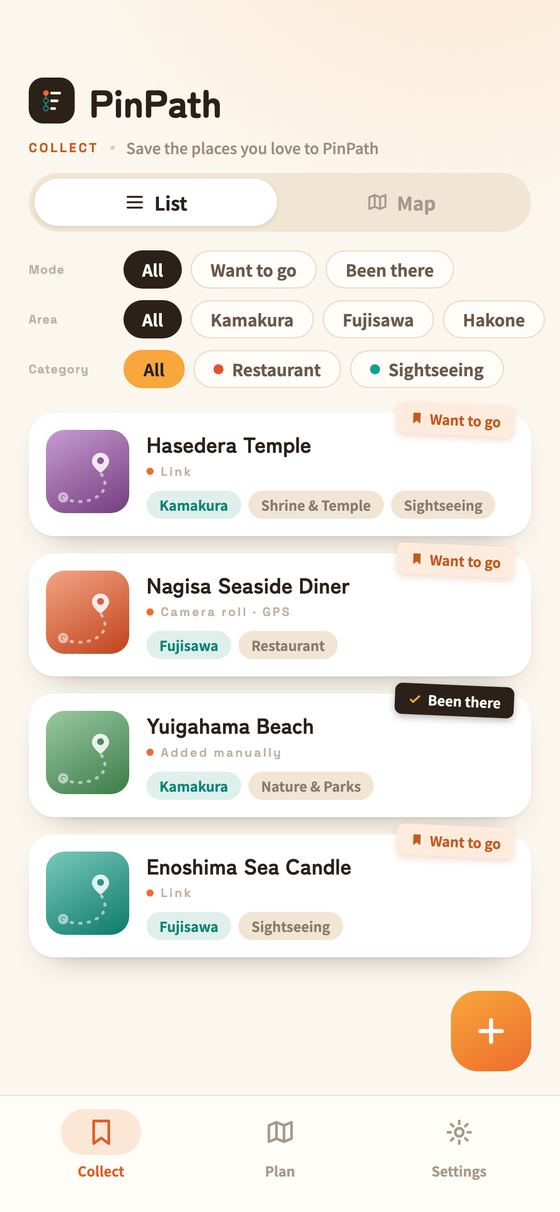
The Collect tab in PinPath: saved places as cards, filtered by mode (want to go / been there), area, and category.

What you can do

Collect, plan, and go together.

Every place you meant to visit becomes your next trip.

Collect the places you love.

Save places from a photo, a link, or by hand — and straight from the share sheet in other apps. Check them off once you go, and they become a record.

Turn places into a plan.

Reorder on the board for a timed itinerary — or pick your stops and let AI build it.

Plan it together.

Invite with a link and edit the same plan together.

Features

A closer look at what it does.

From saving a place to finding your way there on the day — and the record you keep afterwards. Here's what PinPath actually does for you.

01 Collect

One tap, the moment you see it.

Four ways in. AI works out the place for you, so it lands with a name, an address, and a category already filled in.

  • From a photoTake one on the spot, or pick from your camera roll. PinPath reads the photo's location and the signage in it to identify the place.
  • From a linkPaste the URL of an article or blog post. Every place mentioned in it can be selected and saved, one after another.
  • From the share sheetSend a page straight to PinPath from any other app.
  • By handWrite it in your own words. Typing a place yourself never uses an AI extraction.
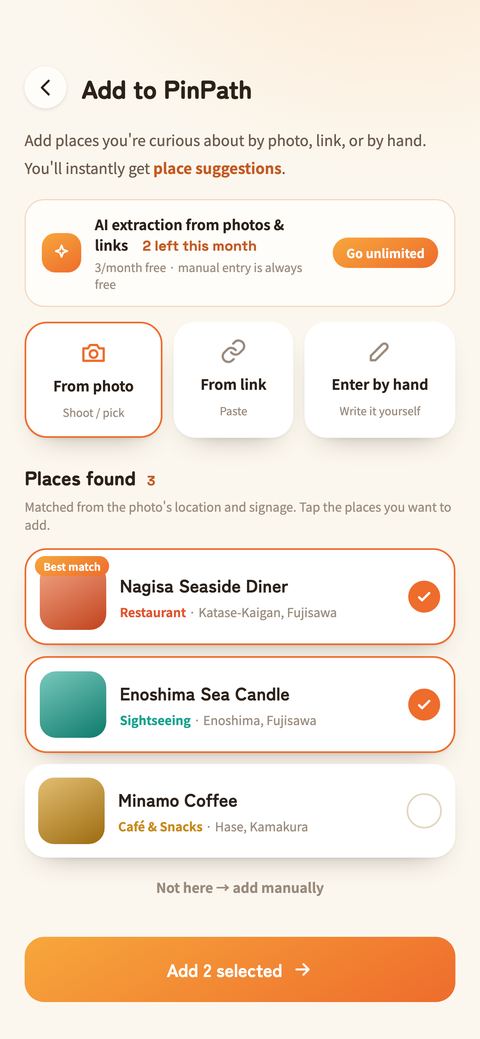
The add flow: From photo, From link, and Enter by hand, how many AI extractions are left this month, and the list of places found.

02 Find

Filter by mode, area, and category.

Switch between a list and a map to see everything you've saved — however much that grows.

  • Three axes to filter byMode (want to go / been there), area, and category — one tap each. Places added by AI get an area tag from their address automatically.
  • List and mapSaved places also appear on the map as pins, colored by category. Card numbers match the pins.
  • The same filters on the mapFilters float above the map instead of taking space from it. Active ones show as pills you can drop one by one.
  • Tidy your tagsRenaming or deleting a tag updates every place already saved with it.
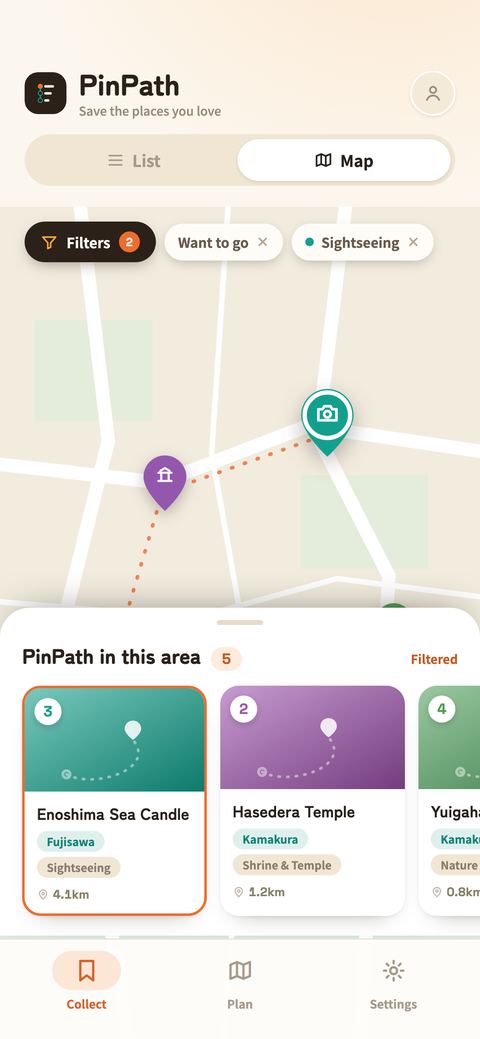
The map view: pins colored by category, a Filters button and active filter pills floating above the map, and numbered place cards below.

03 Plan

Saved places, turned into a timed itinerary.

Pick where you want to go and the order and timings fall into place — then change whatever you like.

  • Reorder on the boardPress and drag to move a stop. Arrival times and how long you stay are editable right there.
  • Let it build itselfChoose the areas, a pace — relaxed, normal, or packed — and what time the day starts, and AI lays out the rest.
  • Lunch and dinnerMeal slots are filled from the restaurants you've saved.
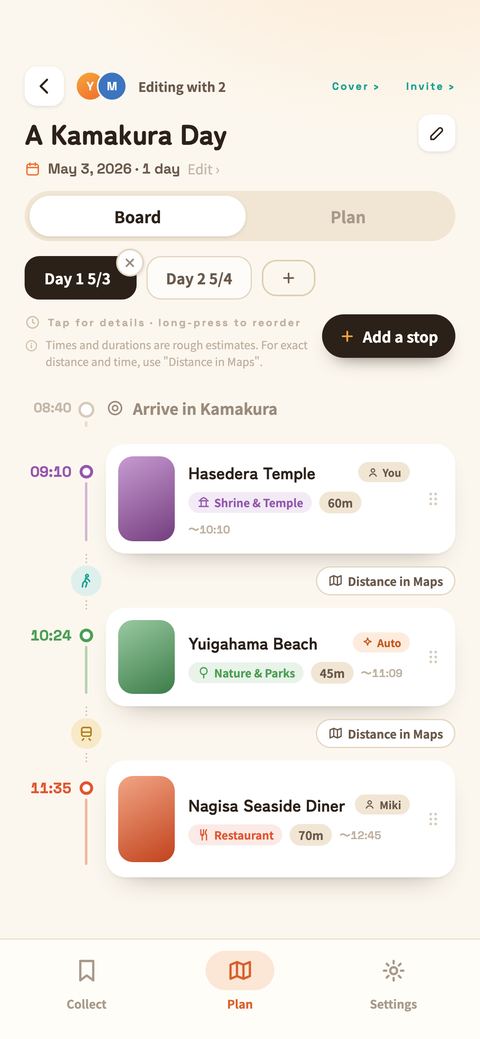
The board: day one's stops with arrival times and stay lengths, and the travel mode and Distance in Maps between them.

04 Transport & stays

How you travel, and where you sleep.

Decide how you'll get around and where you're staying, and the plan is built to match.

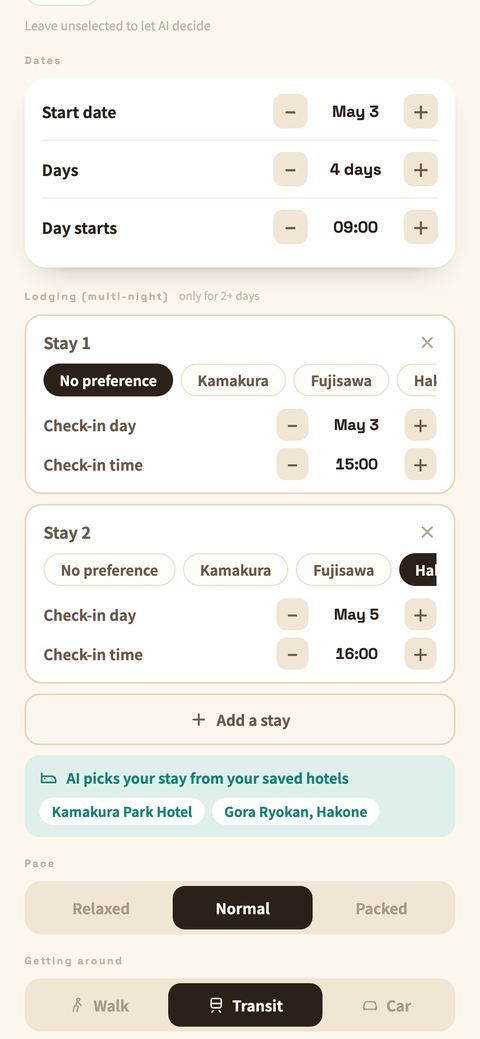
  • Three ways to travelOn foot, public transport, or by car. Set a default for the trip — and tap between two stops on the board to change just that leg.
  • Multi-night staysAdd a stay for each night of the trip (up to days − 1), each with its own check-in date and time.
  • Stays come from your savesHotels are picked from the ones you've saved, matched to your dates. No saved stays? It plans without them.
  • Set the paceRelaxed, normal, or packed — how much you want in a single day.
The auto-plan sheet: check-in date and time for each stay, stays picked from your saved hotels, pace, and how you get around.

05 On the day

Directions in Google Maps, one tap away.

On the day itself, all you need is where you're going next and how. The navigating is left to the map app you already use.

  • Route to the next stopOpen directions from this stop to the next one in Google Maps, in the travel mode you chose.
  • See one place on the mapOpen any saved place in Google Maps from its address or coordinates.
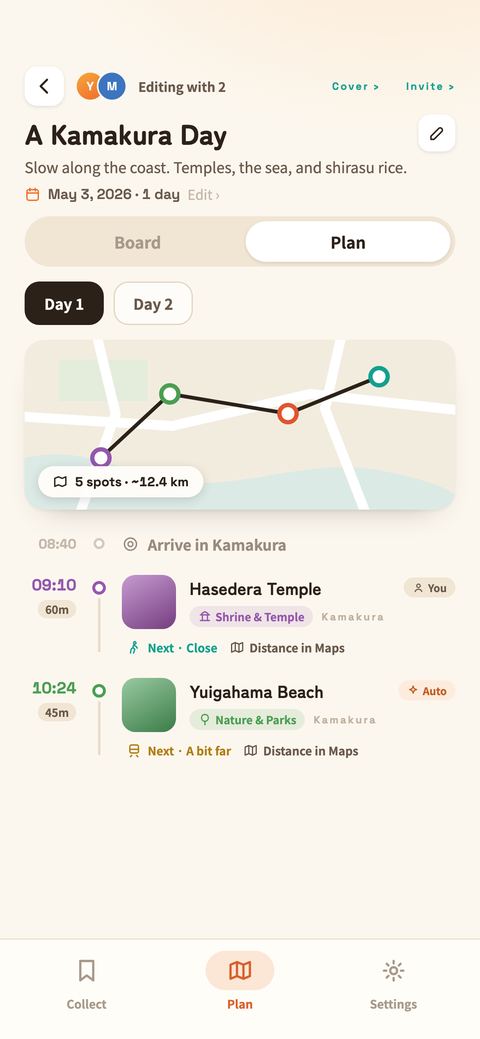
  • Arrival, stay, and who added itArrival time, how long you're staying, and who put the stop there — all in one view.

Times and durations in the app are estimates. For exact distances and travel times, hand off to Google Maps.

The Plan view: a map of the day's route, arrival times, stay lengths, who added each stop, and Distance in Maps for the next leg.

06 Want to go / Been there

Check it off, and it becomes a record.

So collecting isn't the end of it. Check off a place once you've been, and it leaves your want-to-go list and stays as a record of the trip.

  • One tap to switchTap the sticker on the card. Want to go is amber, been there is a dark check — you can tell them apart anywhere in the list.
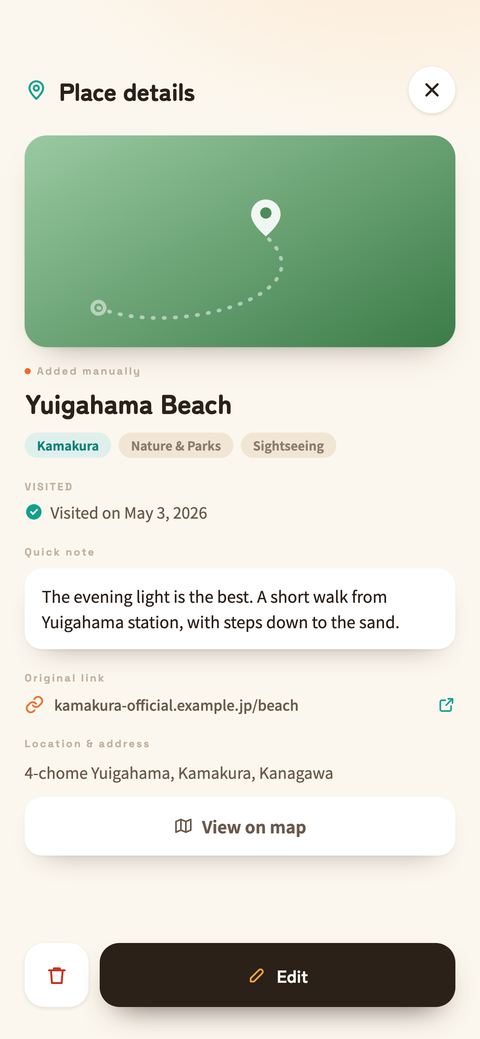
  • The day you went staysThe date you checked it off is kept on the place as "Visited on…", along with your quick note and the original link.
  • It filters, tooShow only want-to-go to plan what's next, or only been-there to look back. The map filters the same way.
Place details: a Visited on May 3, 2026 check, a quick note, the original link, the address, and a view-on-map button.

PinPath Pro

For people who collect a lot.

¥400 / month · ¥4,000 / year

  • Unlimited automatic extraction from photos and links (free: 3 per month)
  • 5 automatic plans every month (free: 3 in total)
  • Unlimited custom categories (free: up to 5)

Saving places by hand, planning them yourself, and sharing stay free and unlimited.

PinPath Pro is an auto-renewing monthly or yearly subscription. It renews automatically unless canceled at least 24 hours before the end of the current period. Manage or cancel anytime in your App Store account settings. See the terms of service and privacy policy.

FAQ

Common questions

What can I do for free?

Saving places by hand, building plans yourself, and sharing them are never capped. Add as many stops as you like, reorder them, edit the times — all free, with no limit.

The only limits are on the parts AI does for you: automatic extraction from a photo or link (3 per month) and automatic plan generation (3 in total). PinPath Pro makes extraction unlimited, raises automatic plans to 5 per month, and lets you add unlimited custom categories.

What can I save?

Photos and screenshots, links from social posts and articles, the share sheet in other apps, or plain text you type yourself. Paste a travel article and every place in it can be saved one after another.

Can I plan with other people?

Share a plan with a single link. People can look before they join, and once they join they edit alongside you. You decide who edits and who only views.

Where is my data stored?

In your account on Firebase (Google Cloud). See the privacy policy for details.

Will my places survive a new phone?

Link your Google or Apple account under Settings › Account linking and you can pick up on a new device with the same data. Without linking, everything stays on that one device.

Can I make the text larger?

Settings › Text size offers standard, large, and extra large. PinPath also follows your iPhone's own text size setting.

How do I cancel?

Anytime from your App Store account settings. Cancel at least 24 hours before the period ends and it will not renew.

Start your next trip.

Every place you save, on the way somewhere.

Coming soon to the App Store

Need a hand? Visit support.